

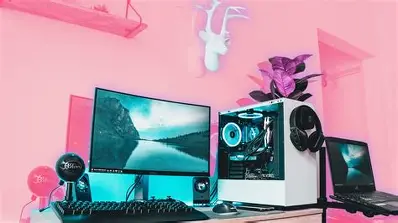
H1: The Ultimate Guide to Pink Gaming PCs: Style, Performance, and Customization
A pink gaming PC is more than just a unique color choice—it’s a statement about your personality, your gaming style, and your appreciation for aesthetic customization. Whether you are a casual gamer or a hardcore enthusiast, incorporating a pink gaming PC into your setup can bring a fresh, vibrant look that reflects your tastes. But beyond its eye-catching appeal, a pink gaming PC is just as capable as its black or white counterparts, offering high-end performance and customization options.
This guide explores everything you need to know about pink gaming PCs, including the best models, performance considerations, customization tips, and much more. Whether you’re considering buying one or building your own, this article will help you make an informed decision.
H3: Understanding the Appeal of Pink Gaming PCs
The popularity of pink gaming PCs has risen significantly in recent years, driven by the desire for more personalized, visually striking gaming setups. For some, pink is a symbol of fun and creativity; for others, it’s simply a way to stand out in a sea of black, white, and RGB builds. Whatever the reason, the appeal is clear—pink PCs offer a unique, stylish way to express personality while delivering exceptional gaming performance.
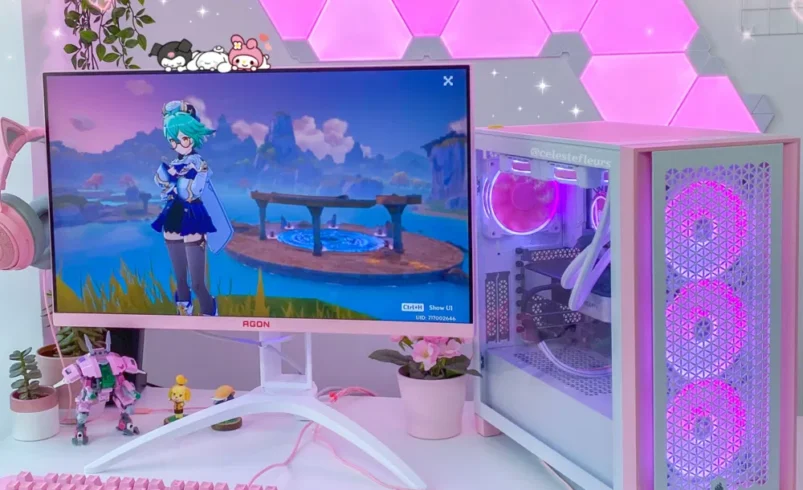
A pink gaming PC can take many forms, from subtle pastel tones to bold, vibrant hues. Some gamers go all-in with a full pink setup, including pink keyboards, mice, and headphones, while others may prefer just a touch of pink in the case or RGB lighting. No matter how much pink you incorporate into your gaming space, it’s a trend that shows no signs of slowing down.
H3: Key Features of a Pink Gaming PC
At its core, a pink gaming PC functions just like any other gaming system. The primary difference is the color of the case, components, and peripherals. Below are the key features that define a pink gaming PC:
- Aesthetic Design: The pink color scheme is often the main focus, with carefully chosen pink components, cases, and accessories. The color of your PC case and peripherals can set the mood and vibe for your gaming setup, whether you’re aiming for a soft pastel look or a bold, neon design.
- Performance: Color does not affect the performance of a gaming PC. Whether you’re running an entry-level or a high-end gaming rig, the components inside (such as the GPU, CPU, RAM, etc.) are what truly matter. A pink gaming PC can be as powerful as any other PC, delivering smooth gameplay even at high settings.
- Customization: A pink gaming PC is often a custom build, with options for adding pink-colored components. Gamers can choose specific parts—such as pink LED fans, pink RAM, or even a pink GPU—making each system unique to its owner.
While the pink gaming PC stands out for its aesthetic appeal, the performance and functionality remain on par with other gaming systems.
H2: Top Pink Gaming PC Models to Consider in 2025
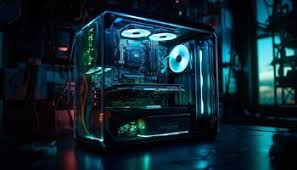
When it comes to prebuilt pink gaming PCs, there are several models that stand out due to their design, performance, and customization options. Here are some of the top choices:
H3: Best Prebuilt Pink Gaming PCs
If you’re looking for a pink gaming PC but don’t have the time or experience to build your own, a prebuilt option might be the right choice. These systems come ready to use, offering a hassle-free experience. Some popular brands and models in 2025 include:
- Alienware Aurora R13
- Design: A futuristic design with a customizable RGB lighting system that allows you to add a pink glow to the case.
- Performance: Equipped with Intel’s 12th generation processors and NVIDIA GeForce RTX 30 series GPUs, this system offers outstanding performance for gaming at high resolutions and settings.
- Customization: While the case is a neutral white, you can customize the internal lighting to give it a pink glow. Additional pink peripherals are also available.
- Corsair Vengeance i7200
- Design: The i7200 comes with a sleek black or white chassis, but you can select pink accent colors and LED lighting options to achieve the desired pink aesthetic.
- Performance: Powered by Intel Core i9 processors and NVIDIA GeForce RTX graphics, it’s ideal for 4K gaming, VR, and streaming.
- Customization: Highly customizable, allowing for different pink-themed parts and accessories like pink fans, cases, and cables.
- NZXT Streaming PC
- Design: Known for its clean, minimalistic design, NZXT offers custom pink cases with RGB lighting to complement the PC’s aesthetic.
- Performance: Prebuilt with powerful specs suitable for gaming and streaming. Choose from a variety of configurations to fit your needs.
- Customization: Choose pink lighting, a pink GPU, and other components to create a striking pink PC build.
H3: Customizing Your Pink Gaming PC Build
For those who prefer a more hands-on approach, customizing your own pink gaming PC is an exciting option. By selecting individual components, you can create a system that’s tailored to both your style and performance needs.
Here’s a breakdown of how you can customize your own pink gaming PC:
- Pink Gaming PC Case: One of the most important components of a custom build, the case will serve as the foundation of your pink-themed PC. Popular brands like Cooler Master and Corsair offer pink cases or cases with pink accent options.
- RGB Lighting: Incorporate RGB LED strips or fans to illuminate the inside of your PC case. Most RGB lighting can be customized to glow in various shades of pink, giving your build a personalized look.
- Pink RAM: Many memory manufacturers, such as Corsair, offer RAM sticks with colorful heatsinks. Choose pink RAM to match your theme.
- Pink GPU: While it’s harder to find a fully pink GPU, some models, like the ASUS ROG Strix and MSI Gaming X Trio, offer pink accents or customizable LED lighting, allowing you to add a pink glow to your system.
- Pink Accessories: Don’t forget peripherals! Pair your pink gaming PC with a matching pink keyboard, mouse, headset, and even a pink gaming chair for a complete setup.
When building your own pink gaming PC, remember that performance should always be the priority. While aesthetics are important, make sure you choose high-quality components that will deliver the performance you need for gaming.
H2: Customizing Your Pink Gaming PC: Color, Accessories, and More
After setting up your pink gaming PC, it’s time to further personalize your gaming space with complementary accessories. Below are some ways you can enhance your pink gaming setup.
H3: Pink Gaming PC Cases: Best Designs for Your Setup
The case is the most visible component of any gaming PC, so choosing the right one is essential. Here are a few options for pink gaming PC cases:
- Cooler Master MasterBox Q300L: A compact pink case that provides excellent airflow and space for high-end components. It’s a great choice for smaller builds.
- Corsair 4000X RGB: This case comes with tempered glass panels and customizable RGB lighting, which can be set to pink. It’s a mid-tower case with plenty of space for expansion.
- Thermaltake Core P3: If you prefer an open-frame design, this case allows you to showcase your components. You can customize it with pink accent lighting for a striking effect.
H2: Performance Considerations for Pink Gaming PCs
When it comes to gaming, performance is paramount. While a pink gaming PC will undoubtedly stand out in terms of its aesthetic, it’s the internal components and how they work together that will truly impact your gaming experience. Below, we’ll address common performance-related concerns and considerations for anyone looking to build or buy a pink gaming PC.
H3: Does a Pink Gaming PC Impact Performance?
One of the most common misconceptions about pink gaming PCs is that the color could somehow affect performance. This is simply not the case. The pink color scheme only impacts the external design of your computer and does not affect the internal performance components.
What truly matters for performance are the specifications of the CPU, GPU, RAM, cooling system, and other components inside the PC. Whether your gaming PC is pink, black, or white, the specs you choose will determine how well the system runs.
- CPU and GPU: These are the two most critical components for gaming performance. For smooth gameplay at high settings, ensure your pink gaming PC has a powerful CPU (such as an AMD Ryzen or Intel Core i7 or i9) and a GPU capable of running the latest games at 1080p or 4K (such as the NVIDIA GeForce RTX series or AMD Radeon RX series).
- RAM: Opt for at least 16GB of RAM for modern gaming, with 32GB being a better option for more demanding titles or multitasking, like streaming and gaming simultaneously.
- Storage: Solid-State Drives (SSD) are essential for faster boot times and reduced loading screens. You can also add a secondary hard drive (HDD) for additional storage.
- Cooling: High-performance components require efficient cooling to maintain optimal performance. Make sure your pink gaming PC includes high-quality fans or liquid cooling systems to prevent overheating.
- While color does not impact performance, it’s essential to choose high-performance components that will allow you to enjoy games at the highest settings.
- H3: Choosing the Right GPU and CPU for Gaming
- When building a pink gaming PC, choosing the right GPU and CPU is crucial for ensuring smooth gaming performance. These components directly influence how well your PC can handle demanding games and tasks. Here’s what to look for when selecting these two components:
- Graphics Processing Unit (GPU): The GPU is the heart of gaming performance. For 1080p gaming, the NVIDIA GeForce GTX 1660 Ti or AMD Radeon RX 5600 XT are solid choices. For 1440p or 4K gaming, consider higher-end options like the NVIDIA GeForce RTX 3070 or RTX 3080 for superb performance in demanding games and virtual reality.
- Central Processing Unit (CPU): The CPU determines how fast your PC can process tasks. For gaming, an AMD Ryzen 5 or 7 or Intel Core i7 should suffice for most games, but if you want to future-proof your system, an Intel Core i9 or AMD Ryzen 9 is ideal for high-end gaming and streaming.
- When selecting your GPU and CPU, always ensure that both components are balanced. A powerful CPU with a weak GPU or vice versa can create a bottleneck, where one component limits the performance of the other.
- H3: Cooling and Maintenance for Pink Gaming PCs
- Overheating is a serious concern in any gaming PC, including pink gaming PCs. High-performance components generate a lot of heat, which can reduce the system’s lifespan and performance. Here are some cooling and maintenance tips to ensure your pink gaming PC runs efficiently:
- Cooling Solutions: There are two main types of cooling systems: air and liquid. Air cooling involves fans that circulate air to dissipate heat, while liquid cooling uses a pump to circulate coolant through tubes to cool the CPU and GPU. Both options are effective, but liquid cooling tends to be more efficient, especially for high-performance systems.
- Airflow: Proper airflow is essential for maintaining temperatures in a gaming PC. Ensure that the pink gaming PC case you choose has sufficient space for airflow. Look for cases with intake and exhaust fans, and make sure cables are neatly managed to avoid obstructing airflow.
- Regular Maintenance: Clean the inside of your pink gaming PC regularly to remove dust buildup. Dust can clog fans and vents, reducing airflow and causing overheating. Use compressed air or a soft brush to clean components, particularly the GPU and CPU cooler.
- By maintaining good airflow and cooling systems, your pink gaming PC will continue to perform at its best, even during intense gaming sessions.
H2: Pink Gaming PC vs. Other Color Schemes: Pros and Cons
When choosing a gaming PC, one of the first decisions is the color scheme. While the aesthetic appeal of a pink gaming PC is undeniable, it’s important to understand how it compares to other popular color schemes. This section will explore the pros and cons of opting for a pink gaming PC versus other common color choices like black, white, and RGB.
H3: The Popularity of Pink in Gaming Setups
Over the years, pink has emerged as a bold and unique color choice for gaming setups. Unlike the more traditional black or white, pink offers a fresh, playful, and vibrant vibe that resonates with gamers looking to add personality to their rigs. In recent times, pink has become more mainstream, especially with custom gaming PC builders offering prebuilt pink cases, RGB lighting, and accessories.
While black and white gaming PCs remain the most popular choices due to their versatile designs, pink offers a way for gamers to stand out and make a personal statement. Pink also allows for customization through RGB lighting, which can be set to a range of hues, including different shades of pink.
H3: Pros of Choosing a Pink Gaming PC
- Uniqueness: A pink gaming PC is far less common than standard black or white builds, making it an excellent choice for gamers who want to showcase their individuality.
- Customization: Pink can be combined with other color accents, such as white, purple, or neon, to create a one-of-a-kind look. With RGB lighting, you can even change the color to fit your mood or game.
- Aesthetic Appeal: Pink is a versatile color that works well in both bright and subdued gaming environments. Whether you’re creating a pastel theme or a vibrant, bold look, pink can bring a refreshing aesthetic to your gaming setup.
H3: Cons of Pink Gaming PCs
- Limited Component Choices: Compared to black or white cases, pink gaming PC cases and components may be harder to find, limiting your choices for certain parts. While RGB lighting can compensate, you may need to search for specific brands or models to achieve your desired look.
- Higher Price Tags for Custom Builds: Custom pink builds, especially those involving rare components, may come at a premium. As demand for pink gaming PCs increases, so too do prices for rare or limited-edition pink parts.
H3: Pink Gaming PCs vs. Black, White, and RGB PCs
- Black Gaming PCs: Black remains the most popular color choice because of its sleek, timeless look. It’s versatile and works with any theme. However, black PCs can lack personality unless you add custom lighting or accessories.
- White Gaming PCs: White is a popular alternative for gamers who want a clean, modern aesthetic. It pairs well with RGB lighting, but white can be harder to keep clean and might not stand out as much as a pink PC.
- RGB Gaming PCs: RGB setups are customizable and allow for endless color combinations, including pink. However, RGB systems can sometimes feel flashy or overdone, depending on how the lighting is configured.
H2: How to Build a Pink Gaming PC: Step-by-Step Guide
Building your own pink gaming PC is an exciting and rewarding process that allows you to create a personalized gaming rig that matches your style and performance needs. While it may seem intimidating, with the right tools, components, and guidance, anyone can build their dream pink gaming PC. Below is a step-by-step guide to help you through the process.
H3: Choosing the Right Pink Gaming PC Case
The PC case is the first and most important component in your build. Not only does it define the overall aesthetic of your pink gaming PC, but it also plays a significant role in cooling and cable management. Here’s what to consider when choosing your case:
- Size: PC cases come in different sizes, including full towers, mid towers, and mini-ITX cases. The size of your case will determine how many components you can fit and how much airflow is available. Choose a case that provides ample space for your motherboard, GPU, and other components.
- Cooling: Ensure that the case you choose has good airflow to keep your components cool. Look for cases that come with pre-installed fans or have space for additional cooling systems. Some pink gaming PC cases come with built-in RGB fans that can be customized to match your aesthetic.
- Design: Select a pink gaming PC case that aligns with your overall design preferences. Some cases offer solid pink exteriors, while others feature subtle pink accents or RGB lighting that can be customized to glow pink.
Popular pink gaming PC case options include the Cooler Master MasterBox Q300L, the Corsair 4000X RGB, and the Thermaltake Core P3.
H3: Selecting the Components for Optimal Performance
Once you’ve chosen your pink gaming PC case, it’s time to select the internal components that will power your system. While aesthetics are important, performance should be your top priority. Here are the key components you’ll need to choose for your pink gaming PC:
- CPU (Central Processing Unit): The CPU is the brain of your computer and directly impacts gaming performance. For gaming, an AMD Ryzen 7 or Intel Core i7 should be sufficient. If you want the best performance, consider an AMD Ryzen 9 or Intel Core i9.
- GPU (Graphics Processing Unit): The GPU is essential for smooth gaming at high settings. For 1080p gaming, a NVIDIA GeForce GTX 1660 Ti or AMD Radeon RX 5600 XT will do the job. For 1440p or 4K gaming, you’ll need something more powerful, like the NVIDIA GeForce RTX 3070 or RTX 3080.
- RAM (Random Access Memory): For modern gaming, 16GB of RAM is the bare minimum. If you plan to multitask (gaming and streaming), consider going for 32GB of RAM.
- Storage: SSDs (Solid-State Drives) offer faster load times and better overall system responsiveness. Choose at least a 500GB SSD for your primary storage, with a larger HDD for additional space if needed.
- Motherboard: Choose a motherboard that supports your chosen CPU and has enough ports for all your components. Ensure it has enough PCIe slots, RAM slots, and USB ports to support your build.
- Power Supply Unit (PSU): A reliable PSU is crucial for powering your entire system. For a gaming PC, a PSU with at least 650W of power is recommended. If you’re using high-end components, consider a 750W or higher PSU.
H3: Assembling Your Pink Gaming PC
Now comes the fun part—putting everything together! Follow these steps to assemble your pink gaming PC:
- Prepare the Case: Start by removing the side panels of your pink gaming PC case to give yourself easy access to the interior. Make sure the case is clean and free of any dust or debris.
- Install the CPU: Carefully place the CPU into the CPU socket on the motherboard. Ensure that it’s aligned correctly and securely locked into place. Apply thermal paste if necessary.
- Install the RAM: Slot the RAM sticks into the designated RAM slots on the motherboard. Press down firmly until you hear a click, ensuring they’re properly seated.
- Install the Storage: Mount your SSD and HDD in the appropriate bays. Use the screws provided with your case to secure them in place. Connect them to the motherboard using the appropriate cables.
- Install the GPU: Slot the GPU into the PCIe slot on the motherboard. Secure the GPU with screws to the case, ensuring it’s firmly in place.
- Connect the Power Supply: Attach the PSU to the case and connect all necessary power cables to the motherboard, GPU, RAM, and storage drives.
- Connect Cooling and Fans: Install any additional fans or cooling solutions. Make sure the fans are positioned to promote good airflow (usually front-to-back or bottom-to-top airflow).
- Cable Management: Tidy up any cables inside the case using cable ties or velcro straps. Neat cables not only improve airflow but also make your pink gaming PC look cleaner and more organized.
- Final Checks: Double-check that all components are securely installed and all cables are properly connected. Ensure the fans are facing the correct direction for optimal airflow.
H3: Testing and Optimizing Your Pink Gaming PC Build
After assembling your pink gaming PC, it’s time to power it up and ensure everything is running smoothly.
- Initial Boot: Turn on your PC for the first time and check if all components power on correctly. Ensure that your fans are spinning, your GPU lights up, and your monitor receives a signal from the PC.
- Install the Operating System: Install your preferred operating system (Windows 10 or 11 is the most common for gaming). Follow the prompts to set it up.
- Update Drivers: Install the latest drivers for your CPU, GPU, and motherboard. This ensures optimal performance and compatibility with your games and applications.
- Benchmarking: Use benchmarking software (like 3DMark or Unigine Heaven) to test your pink gaming PC’s performance. Check your frame rates, GPU temperatures, and overall system performance.
- Optimize Settings: Adjust in-game settings for the best performance-to-quality ratio. You may need to tweak graphics settings for smoother gameplay.
By following these steps, you can create a pink gaming PC that not only looks amazing but also delivers the performance you need for an exceptional gaming experience.
H2: Where to Buy Pink Gaming PCs and Accessories
Now that you know how to build your own pink gaming PC, you may be wondering where to buy the components or even a prebuilt system. Below, we list some of the best places to purchase pink gaming PCs and accessories.
H3: Best Online Retailers for Pink Gaming PCs
If building your own system isn’t for you, or if you simply want a prebuilt pink gaming PC, there are several online retailers that offer a wide selection of options:
- Amazon: Amazon is home to a wide range of prebuilt pink gaming PCs, as well as individual components like pink cases, RGB lighting, and peripherals.
- Newegg: Specializing in computer components, Newegg offers a selection of customizable gaming PCs, including those with pink cases and components.
- Custom PC Builders: Websites like iBUYPOWER, CyberPowerPC, and Origin PC allow you to fully customize your PC, including the option for pink components, RGB lighting, and more.
H3: Pink Gaming PC Customization Services
If you want a completely unique pink gaming PC, there are companies that specialize in custom builds. These services can help you choose the perfect parts and assemble them into a pink gaming PC that matches your aesthetic preferences.
- PCSpecialist: PCSpecialist offers custom-built gaming PCs with a variety of color and design options, including pink. They allow you to fully customize every part of the build.
- Xidax: Xidax is another company that offers custom-built PCs, and they are known for their attention to detail and unique designs. They offer pink LED lighting and custom cases.
H2: Frequently Asked Questions (FAQs)
As with any niche topic, there are always plenty of questions that gamers have about pink gaming PCs. Below are some of the most frequently asked questions (FAQs) related to pink gaming PCs, with clear and concise answers to help you make informed decisions.
H3: Can I build a pink gaming PC on a budget?
Yes! It’s entirely possible to build a pink gaming PC on a budget. While custom parts and accessories in pink may be slightly more expensive than standard options, you can still create an affordable pink-themed PC. Here are a few tips to keep costs down:
- Use a simple pink case: Many budget-friendly cases come with minimal pink accents or RGB lighting. You can also use a standard black or white case and add pink LED strips for a pop of color.
- Stick to mid-range components: You don’t need to buy the highest-end GPU or CPU to build a solid pink gaming rig. Look for good value options like the AMD Ryzen 5 or NVIDIA GeForce GTX 1660.
- Opt for DIY accessories: Instead of buying all pink peripherals, you can find affordable pink accessories, such as a pink keyboard or mouse, that match your build.
By balancing aesthetics and performance, you can easily create a budget-friendly pink gaming PC without sacrificing too much on the quality of your build.
H3: Is pink a good color choice for a gaming PC?
Choosing pink for your gaming PC is a great idea if you want something unique and personal. While it may not be the most traditional color for a gaming PC, pink has a distinct appeal:
- Unique look: A pink gaming PC stands out from the crowd of standard black, white, and RGB rigs. It’s a great way to express your personality and make your setup one-of-a-kind.
- Customizable: With RGB lighting, you can adjust the shades of pink or add complementary colors to create the perfect look for your gaming space.
- Stylish and fun: Pink adds a playful vibe to your gaming rig, and it’s perfect for gamers who want their setup to reflect a fun, energetic aesthetic.
If you’re looking for something that breaks away from the norm and makes a statement, a pink gaming PC is definitely a good choice.
H3: How can I make my gaming setup more stylish with pink?
To create a stylish pink gaming setup, consider integrating pink not only into your PC but also into your peripherals and room design. Here are some tips to enhance your setup:
- Pink peripherals: Pair your pink gaming PC with a matching pink keyboard, mouse, and headset. Many brands offer RGB-enabled peripherals that can light up in pink or be customized to match your PC.
- Pink lighting: Use RGB lighting strips around your desk, monitor, or PC case to create a cohesive pink look. Many lighting options are customizable, so you can adjust the hues to match your personal style.
- Furniture and decor: Add pink gaming chairs, mousepads, and even wall posters to your setup. This will tie the entire space together and create a cohesive theme.
By coordinating your gaming setup with pink elements, you’ll create a visually stunning environment that’s both functional and aesthetically pleasing.
H3: Are pink gaming PCs as powerful as other colored PCs?
Absolutely! The color of your gaming PC does not affect its performance. Pink gaming PCs are just as powerful as black or white gaming PCs as long as they have the same internal components. The performance of your gaming system is determined by:
- CPU (Central Processing Unit)
- GPU (Graphics Processing Unit)
- RAM
- Storage (SSD/HDD)
- Cooling system
As long as you select high-performance components, your pink gaming PC will offer the same level of power and speed as any other PC, regardless of its color. The only difference is the visual appeal and unique style.
H3: How do I keep my pink gaming PC cool?
Maintaining proper cooling is crucial for any gaming PC, especially a pink gaming PC with high-end components. To keep your system cool and running smoothly, follow these tips:
- Ensure good airflow: When selecting your pink gaming PC case, choose one with good airflow. Cases with mesh fronts or top vents allow air to flow freely, preventing overheating.
- Add extra cooling: Depending on your system’s needs, you may want to install additional fans or even a liquid cooling system. RGB fans can be a great addition to your pink gaming PC, providing both cooling and aesthetic appeal.
- Monitor temperatures: Use software like HWMonitor or MSI Afterburner to keep track of your PC’s temperature. If your GPU or CPU is running too hot, you may need to increase airflow or adjust your cooling solution.
- Regular maintenance: Clean your PC regularly to remove dust buildup, which can block airflow and reduce cooling efficiency. Use compressed air to gently clean the components.
By keeping your pink gaming PC cool, you’ll ensure optimal performance and extend the lifespan of your system.
H2: Conclusion: Is a Pink Gaming PC Right for You?
A pink gaming PC is more than just a color choice—it’s a reflection of your personality and style. Whether you want to build a custom rig or buy a prebuilt system, a pink gaming PC offers a unique way to stand out while delivering top-notch gaming performance.
By following the guidelines and tips provided in this article, you can build a pink gaming PC that not only looks amazing but also performs at a high level. From selecting the right components to customizing your setup, there’s no limit to how you can make your pink gaming PC truly your own.
Final Thoughts on Building or Buying a Pink Gaming PC
Ultimately, whether or not a pink gaming PC is right for you depends on your personal preferences. If you’re looking for a gaming rig that reflects your individuality and adds a pop of color to your gaming space, a pink gaming PC is the perfect choice. With customizable options, high performance, and aesthetic appeal, a pink gaming PC can elevate your gaming experience and make your setup one-of-a-kind.
The Future of Gaming PC Customization
As the gaming industry continues to evolve, customization will remain a key aspect of the gaming experience. The rise of RGB lighting, customizable components, and unique color schemes like pink demonstrates how gamers can personalize their setups to reflect their tastes and preferences. Whether you’re into high-end builds or budget-friendly systems, the future of pink gaming PCs looks bright, and the options for customization will only continue to grow.