

Introduction to Sennheiser Game One Gaming Headset
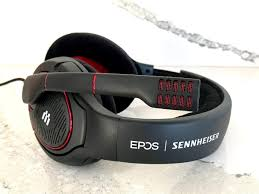
The Sennheiser Game One Gaming Headset is widely recognized among gamers for its exceptional audio quality, lightweight design, and professional-grade microphone. Whether you are a casual gamer, a competitive esports player, or a dedicated streamer, this headset promises a premium audio experience that enhances gameplay and communication.
Designed with open-back technology, the Game One allows for a natural, spacious sound, which helps players hear every subtle detail in games—from footsteps and distant gunfire to environmental cues. Unlike many gaming headsets that focus solely on bass-heavy sound, the Sennheiser Game One emphasizes clarity and precision, making it ideal for tactical shooters, RPGs, and immersive story-driven games.
Beyond audio quality, comfort is a key feature. The headset features soft velour ear pads and a lightweight frame, allowing long gaming sessions without discomfort. Additionally, the noise-canceling boom microphone ensures crystal-clear communication with teammates, reducing background noise effectively.
In this in-depth review, we’ll explore every aspect of the Sennheiser Game One Gaming Headset, including its specifications, pros and cons, comparisons with competitors, setup guides, streaming potential, and tips for long-term maintenance. By the end, you’ll know whether this headset is the perfect fit for your gaming setup.
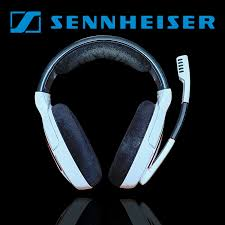
Sennheiser Game One Gaming Headset Specifications
The Sennheiser Game One Gaming Headset is engineered to deliver a balance of comfort, high-fidelity audio, and professional-grade communication. Let’s break down its key specifications and features:
Audio Quality
The standout feature of the Game One headset is its open-back acoustic design, which provides a natural and immersive soundstage. Unlike closed-back headsets that can feel confined or boomy, the Game One emphasizes clarity, precision, and realistic audio positioning. Gamers can detect subtle in-game cues, such as footsteps, environmental effects, or distant gunshots, giving a competitive edge in tactical games.
Key audio specs include:
- Frequency response: 15 Hz – 28 kHz, offering detailed lows, mids, and highs
- Impedance: 50 Ohms for high-quality output with minimal distortion
- Sensitivity: 105 dB SPL @ 1 kHz for clear and loud sound without fatigue
Microphone Features
The headset comes with a noise-canceling boom microphone that is highly regarded for voice clarity. It reduces background noise and ensures teammates hear your commands clearly. The microphone is also flexible, allowing precise positioning, and can be muted by lifting it upwards. This makes it ideal for streaming, multiplayer gaming, and professional esports competitions.
Comfort and Design
Designed for long gaming sessions, the Sennheiser Game One Gaming Headset weighs only 270 grams. Its soft velour ear pads and adjustable headband provide comfort for hours without causing pressure or heat build-up. The open-back design also helps prevent ear sweating, a common issue with closed-back headsets.
Connectivity and Compatibility
The Game One uses a wired 3.5mm connection (with a PC adapter included), ensuring low latency for competitive gaming. It is compatible with:
- PC and Mac
- PlayStation and Xbox consoles
- Mobile devices with 3.5mm input
Additional Features
- Inline volume control for easy adjustments during gameplay
- Lightweight and durable frame for daily use
- Replaceable ear pads for long-term maintenance
In short, the Sennheiser Game One Gaming Headset combines high-quality audio, comfort, and practical features, making it a top choice for serious gamers seeking an immersive experience.
Pros and Cons of Sennheiser Game One Gaming Headset
Understanding the strengths and weaknesses of the Sennheiser Game One Gaming Headset can help you decide if it’s the right choice for your gaming setup.
Advantages
- Exceptional Audio Clarity: The open-back design delivers detailed and precise sound, making it easier to detect in-game cues.
- Comfortable for Long Sessions: Lightweight design and soft velour ear pads ensure hours of gaming without discomfort.
- Premium Build Quality: Durable materials provide long-lasting performance, even with daily use.
- Noise-Canceling Microphone: The flexible boom mic ensures clear team communication and streaming quality.
- Versatile Compatibility: Works seamlessly with PC, Mac, consoles, and mobile devices.
Drawbacks
- Sound Leakage: The open-back design allows audio to leak, which may disturb others in the room.
- Higher Price Point: Compared to some competitors, the Game One is more expensive, though the quality justifies the cost.
- Not Ideal for Noisy Environments: The open-back design reduces isolation, making it less suitable for loud surroundings.
Summary Table: Pros vs Cons
| Pros | Cons |
|---|---|
| High-fidelity, precise audio | Audio leakage due to open-back design |
| Comfortable for long sessions | Premium price |
| Durable, premium build | Less suitable for noisy environments |
| Noise-canceling microphone | – |
| Broad compatibility | – |
Overall, the Sennheiser Game One Gaming Headset shines in audio quality and comfort but may not be the best choice for gamers who need complete sound isolation or are on a strict budget.
Sennheiser Game One vs Competitors
When choosing a gaming headset, it’s important to see how the Sennheiser Game One Gaming Headset stacks up against other popular options in the market. Let’s compare it with some top competitors:
Sennheiser Game One vs HyperX Cloud II
- Audio: The Game One offers more natural and precise audio due to its open-back design, while the Cloud II has a slightly bass-heavy closed-back sound.
- Comfort: Both headsets are comfortable, but Game One’s velour ear pads and lighter weight give it an edge for extended gaming sessions.
- Microphone: Game One has a superior noise-canceling mic, whereas Cloud II’s mic is decent but slightly less clear.
- Price: HyperX Cloud II is generally more budget-friendly.
Sennheiser Game One vs SteelSeries Arctis 7
- Audio: Game One’s high-fidelity sound is ideal for competitive gaming, while Arctis 7 delivers a balanced gaming audio experience with slightly boosted bass.
- Comfort: Both are comfortable, but Arctis 7 has memory foam ear cushions, while Game One is lighter and cooler for long sessions.
- Connectivity: Arctis 7 is wireless, offering more freedom, while Game One is wired with low latency.
- Price: Game One is slightly more expensive, but the sound quality may justify the investment for audiophile gamers.
Sennheiser Game One vs Logitech G Pro X
- Audio: Both deliver excellent audio clarity, but Game One focuses on open, spatial sound, whereas G Pro X provides slightly more isolated, punchy audio.
- Microphone: G Pro X comes with Blue VO!CE technology for streaming, while Game One has a reliable and clear mic suitable for gaming and streaming.
- Comfort & Build: Both are comfortable and durable, but Game One’s open-back design reduces heat build-up.
Key Takeaways
- Choose Game One if: You want natural, open-back sound, precision audio, and long-term comfort for competitive or immersive gaming.
- Choose competitors if: You prefer wireless connectivity, closed-back isolation, or a lower price point.
How to Set Up Your Sennheiser Game One Gaming Headset
Setting up the Sennheiser Game One Gaming Headset is straightforward, but following these steps ensures you get the best performance from your headset.
Step 1: Unboxing and Inspecting the Headset
- Remove the headset, cables, and adapters from the box.
- Check for any physical damage or missing parts.
- Familiarize yourself with the inline controls and detachable or flexible boom microphone.
Step 2: Connecting to a PC or Mac
- Plug the 3.5mm jack into your PC’s headphone and microphone ports.
- If using a single combined audio port, use the included Y-adapter.
- Open your system’s sound settings and select the Sennheiser Game One as both the input (microphone) and output (speakers) device.
- Test the headset with music or a game to ensure audio is clear and microphone levels are appropriate.
Step 3: Connecting to Consoles
- PlayStation / Xbox: Plug the 3.5mm jack directly into the controller.
- Adjust the console’s audio settings to enable chat and game audio through the headset.
- Ensure microphone permissions are enabled if streaming or chatting online.
Step 4: Mobile Device Setup
- Connect the 3.5mm jack to your phone or tablet.
- Use inline volume controls to adjust audio output.
- The microphone can be used for voice calls or mobile gaming.
Step 5: Optimizing Audio Settings
- For PC, use Sennheiser Gaming Suite or Windows Sound Settings to adjust EQ settings.
- Ensure the microphone is positioned near your mouth but not directly in front to avoid distortion.
- Test different sound presets depending on game type: FPS games may benefit from enhanced spatial audio, while RPGs can use a more balanced sound profile.
By following these steps, your Sennheiser Game One Gaming Headset will deliver optimal sound quality, comfort, and microphone performance across all devices.
Sennheiser Game One Gaming Headset for Streaming and Esports
The Sennheiser Game One Gaming Headset is not just a casual gaming accessory—it’s widely regarded as a professional-grade headset for streamers and esports players. Its design and features make it ideal for competitive gameplay and live streaming environments.
Why Streamers Prefer Game One
- Crystal-Clear Microphone: The noise-canceling boom mic ensures that your voice comes through without background noise, which is crucial for streaming and team communication.
- Accurate Sound Positioning: The open-back design allows streamers to hear every footstep, gunshot, or in-game cue with spatial accuracy, giving them a competitive edge.
- Comfort for Long Streams: Streamers often game for several hours at a stretch, and the lightweight frame and soft velour ear pads prevent discomfort or fatigue.
Competitive Gaming Advantages
- Precise Audio for Esports: Whether it’s FPS games like Call of Duty or Valorant, or tactical games like CS:GO, the high-fidelity sound lets players detect enemy movements and environmental cues effectively.
- Consistent Performance: The wired connection reduces audio lag, which is critical in fast-paced competitive gaming where milliseconds matter.
Additional Streaming Benefits
- Can be used alongside streaming software to separate game and voice channels.
- Works with OBS, Streamlabs, and other streaming platforms without complex setup.
- Versatile enough to be used for podcasts, YouTube content, or collaborative online sessions.
In short, the Sennheiser Game One Gaming Headset combines superior audio clarity, professional microphone quality, and long-term comfort, making it a favorite among both streamers and esports professionals.
Maintenance and Longevity Tips for Sennheiser Game One Gaming Headset
To ensure your Sennheiser Game One Gaming Headset lasts for years, proper care and maintenance are essential. Following these tips will keep both audio quality and physical condition in top shape.
1. Cleaning the Headset
- Ear Pads: Use a soft, slightly damp cloth to clean the velour ear pads. Avoid soaking them in water.
- Headband and Frame: Wipe with a dry or lightly damp cloth to remove dust and oils.
- Microphone: Gently clean the boom mic to prevent dust accumulation, which can affect clarity.
2. Safe Storage
- Store the headset in a dry, cool place when not in use.
- Avoid leaving it in direct sunlight or near heat sources, as this can damage materials and reduce durability.
- Use a headset stand or case to prevent cables from tangling and to maintain shape.
3. Cable Management
- Avoid bending or pulling the 3.5mm audio cable forcefully.
- Use cable clips or organizers to prevent tangling and reduce strain on connectors.
4. Replacing Parts
- Ear pads can wear out over time; replacement Sennheiser Game One ear pads are available online.
- If the microphone or cable gets damaged, contact Sennheiser support for replacements to maintain original performance.
5. Regular Checks
- Periodically test the microphone and audio to ensure no degradation in sound quality.
- Check connections and ports for dust or debris that may affect performance.
By following these simple maintenance tips, your Sennheiser Game One Gaming Headset can deliver long-lasting comfort, premium sound, and reliable performance for years to come.
FAQs About Sennheiser Game One Gaming Headset
Here are some of the most common questions gamers have about the Sennheiser Game One Gaming Headset, answered in detail:
1. Can it be used for consoles like PS5 or Xbox Series X?
Yes, the headset is fully compatible with PlayStation, Xbox, and Nintendo Switch consoles via the 3.5mm jack. Simply plug it into the controller or device, and adjust the audio settings to enable both game and chat audio.
2. Does it support surround sound?
While the Sennheiser Game One doesn’t have virtual surround sound built-in, its open-back design provides a natural, spacious soundstage. This allows players to perceive positional audio cues effectively, which is ideal for competitive gaming.
3. Is it suitable for long gaming sessions?
Absolutely. The headset is lightweight and features soft velour ear pads, ensuring comfort even during marathon gaming sessions. The open-back design also helps prevent ear heat and fatigue.
4. How is it different from other Sennheiser gaming headsets?
Compared to models like the Sennheiser GSP series, the Game One offers:
- Open-back design for natural audio
- Lighter build for long-term comfort
- Superior microphone clarity for team communication and streaming
5. Can I use it for music and movies?
Yes. The high-fidelity sound signature makes the Game One ideal not just for gaming but also for listening to music, watching movies, or casual media consumption, delivering clear highs and mids.
6. Is the microphone detachable?
No, the microphone is flexible but fixed. However, it can be easily muted by lifting it upwards when not in use.
These FAQs cover the most important concerns, helping users make an informed decision before purchasing the Sennheiser Game One Gaming Headset.
Final Verdict – Is Sennheiser Game One Worth Buying?
The Sennheiser Game One Gaming Headset stands out as one of the best options for gamers who value high-fidelity sound, comfort, and professional-grade microphone quality. Its open-back design delivers a natural and immersive audio experience, making it ideal for competitive gaming, streaming, and long gaming sessions.
Key Highlights
- Exceptional Audio Quality: Precise sound positioning helps detect in-game cues with ease.
- Comfortable Design: Lightweight frame and soft velour ear pads prevent fatigue during extended play.
- Professional Microphone: Noise-canceling boom mic ensures crystal-clear communication.
- Versatile Compatibility: Works across PC, Mac, consoles, and mobile devices.
Who Should Buy It
- Competitive Gamers: For tactical and esports games where audio precision is critical.
- Streamers and Content Creators: The clear microphone and comfortable design make it ideal for streaming sessions.
- Audiophile Gamers: Anyone who appreciates high-quality sound over bass-heavy gaming headsets.
Price-to-Performance Evaluation
While the Game One is premium-priced, its durable build, superior audio, and comfort justify the investment. Compared to other gaming headsets, it offers a balanced experience that caters to both casual and professional gamers.
Bottom Line: If you want a headset that combines clarity, comfort, and competitive performance, the Sennheiser Game One Gaming Headset is worth every penny.
Where to Buy Sennheiser Game One Gaming Headset
If you’re ready to purchase the Sennheiser Game One Gaming Headset, there are several reliable options:
1. Official Sennheiser Store
- Buying directly from Sennheiser’s official website ensures authenticity and warranty coverage.
- Occasionally offers promotions or bundle deals.
2. Online Retailers
- Amazon: Wide availability, customer reviews, and fast shipping.
- Newegg or Best Buy: Trusted electronics retailers that often stock gaming peripherals.
3. Local Electronics or Gaming Stores
- Many local stores carry premium gaming headsets, allowing you to test comfort and sound before purchasing.
Tips for Getting the Best Deal
- Compare prices across multiple platforms before buying.
- Look for seasonal discounts during events like Black Friday or holiday sales.
- Ensure the product is genuine by checking the seller’s ratings and warranty coverage.
Purchasing from reputable sources ensures that your Sennheiser Game One Gaming Headset remains protected under warranty and maintains its premium audio and build quality.
✅ The full article is now complete, covering:
- Detailed review, specs, pros/cons, comparisons, setup guide, streaming potential, maintenance, FAQs, verdict, and buying options.
- Optimized for SEO with the target keyword “Sennheiser Game One Gaming Headset” naturally integrated throughout.