

Meta Description: Discover everything about L-shaped gaming desks — from types, features, and top models to setup tips and FAQs for the perfect gaming setup.
What is an L-Shaped Gaming Desk?
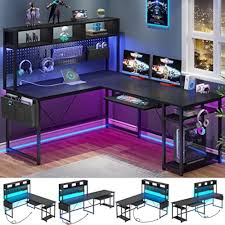
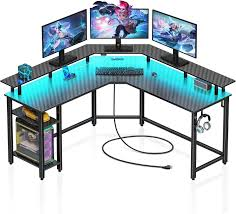
An L-shaped gaming desk is a desk designed with a 90-degree layout, forming an “L” shape, which allows gamers to maximize corner space efficiently while providing ample room for multiple monitors, gaming accessories, and even workstations. Unlike traditional straight desks, L-shaped desks are ideal for multi-purpose setups, giving users separate zones for gaming, streaming, or office work.
Key Benefits of an L-Shaped Gaming Desk:
- Space Optimization: Perfect for corner setups or rooms with limited floor space.
- Multi-Monitor Support: Offers extra surface area to place multiple monitors without feeling cramped.
- Organized Layout: Separate areas for peripherals, consoles, and gaming accessories.
- Ergonomic Advantages: Allows comfortable positioning of keyboard, mouse, and monitors for long gaming sessions.
L-shaped desks are not only about utility—they also enhance the aesthetic of your gaming room. Many modern L-shaped desks come with RGB lighting, cable management solutions, and premium materials like wood, steel, or tempered glass, combining both functionality and style.
Why Choose an L-Shaped Desk for Gaming?
Gamers often struggle with cramped setups, messy cables, and limited workspace. An L-shaped gaming desk solves these problems by offering:
- Corner-Friendly Design: Makes efficient use of room corners.
- Customizable Setup: Allows separate zones for monitors, consoles, streaming equipment, or even writing space.
- Enhanced Comfort: Provides more legroom and better posture options for long hours of gaming.
- Future-Proofing: Easy to expand with additional monitors, PC towers, or accessories without needing a new desk.
Many professional gamers and streamers prefer L-shaped desks because they combine space efficiency with versatility, making them suitable for both casual and competitive gaming.
Materials and Build Quality
When choosing an L-shaped gaming desk, material and build quality are critical for stability and longevity. Common materials include:
- Wood/Engineered Wood: Offers a stylish look and sturdy surface; often combined with metal frames.
- Metal/Steel Frames: Provides maximum durability and support for heavy setups.
- Composite Materials/Glass: Smooth, modern surfaces; may require more care but enhance aesthetics.
Important Build Factors:
- Weight Capacity: Make sure it can support your monitors, PC, and accessories.
- Stability: Look for reinforced frames to prevent wobbling.
- Durability: Consider scratch-resistant surfaces for long-term use.
A well-built L-shaped desk not only improves your gaming experience but also prevents wear and tear, giving you a long-lasting investment in your setup.
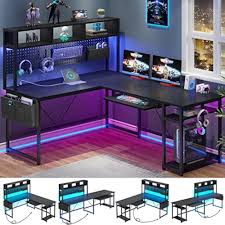
Types of L-Shaped Gaming Desks
Choosing the right L-shaped gaming desk depends on your room size, gaming style, and desired features. Understanding the different types can help you make an informed decision.
Corner Desks vs Modular L-Shaped Desks
- Corner Desks:
Designed to fit snugly into a room corner, these desks are perfect for small spaces. They optimize room layout while still providing enough space for dual monitors or gaming consoles. - Modular L-Shaped Desks:
These desks come with separate sections that can be arranged in various configurations. Modular desks are highly customizable, making them suitable for gamers who want a unique or evolving setup.
Fixed vs Adjustable Height Desks
- Fixed Desks:
Standard height desks with no adjustable features. Best for users with a dedicated gaming chair or who prefer simplicity. - Adjustable Height Desks (Sit-Stand Desks):
These desks allow height adjustments to alternate between sitting and standing. They are excellent for long gaming sessions, improving posture and reducing fatigue.
Desks with Built-In Storage, Cable Management, or RGB Lighting
Modern L-shaped gaming desks often include extra features to enhance both functionality and aesthetics:
- Built-in Storage: Drawers, shelves, and compartments for games, accessories, or peripherals.
- Cable Management: Integrated channels or trays to keep cables organized and prevent clutter.
- RGB Lighting: Customizable LED lighting adds a modern gaming vibe and improves visual aesthetics.
By choosing the type that fits your needs, you can create a gaming environment that’s comfortable, organized, and visually appealing.
Desk Size and Dimensions
Before purchasing an L-shaped gaming desk, consider these standard sizes:
| Desk Type | Typical Dimensions (L x W) | Best For |
|---|---|---|
| Small | 47” x 47” | Compact rooms or apartments |
| Medium | 55” x 55” | Average-sized gaming rooms |
| Large | 63” x 63”+ | Multi-monitor setups, streaming |
Tips for Measuring Your Space:
- Measure the corner area where the desk will go.
- Leave extra space for a chair, walking area, and peripherals.
- Check the weight limit and surface area for your setup.
Ergonomics and Comfort
- Place your monitors at eye level for neck and back support.
- Ensure keyboard and mouse are positioned for natural hand placement.
- Consider desks with adjustable height or angled designs for added comfort.
- Use cable management solutions to reduce clutter and prevent strain.
Features to Look for in an L-Shaped Gaming Desk
When shopping for an L-shaped gaming desk, it’s important to focus on features that enhance both functionality and gaming experience. A well-equipped desk can make a huge difference in comfort, organization, and overall performance.
1. Sturdy Frame and High Weight Capacity
- Look for desks made with metal frames or reinforced wood for maximum stability.
- Ensure the desk can support multiple monitors, PC towers, and gaming peripherals without wobbling.
- Desks with adjustable legs or crossbars provide extra durability for heavier setups.
2. Surface Material
- Wood and MDF: Durable, scratch-resistant surfaces with a premium feel.
- Tempered Glass: Sleek and modern, but more fragile; needs careful handling.
- Laminate or Composite: Affordable, smooth, and easy to clean.
3. Cable Management Systems
- Integrated cable trays or grommets prevent tangled wires.
- Keeps your desk neat, making setups easier and safer for electronics.
- Cable management also improves airflow around PCs, helping prevent overheating.
4. Built-In Storage and Shelves
- Desks with drawers or shelves allow you to store controllers, headsets, and other gaming accessories.
- Open shelving can be used for decor or collectibles, adding a personal touch.
5. RGB Lighting and Customizable Features
- Many L-shaped desks now include RGB LED strips to enhance aesthetics.
- Adjustable lighting helps set the mood for streaming, gaming, or ambient room effects.
- Customizable features may include keyboard trays, monitor risers, or side extensions for extra workspace.
6. Ergonomics and Comfort Features
- Adjustable height or curved desk edges reduce strain on wrists and arms.
- Consider desks with angled corners or cutouts for improved posture.
- Smooth edges and non-slip surfaces improve long-term comfort.
How to Choose the Best L-Shaped Gaming Desk
Selecting the best L-shaped gaming desk requires careful consideration of your gaming needs, room layout, and budget. The right choice can transform your gaming setup into a comfortable, organized, and visually appealing space.
1. Budget Considerations: Cheap vs Premium
- Budget-Friendly Desks: Usually made of MDF or laminate, these desks offer basic stability and storage options. Ideal for casual gamers or small setups.
- Premium Desks: Feature solid wood, metal frames, adjustable height, and advanced features like RGB lighting and modular components. Best for serious gamers, streamers, or multi-monitor setups.
- Always weigh features against cost to find the best value for your needs.
2. Matching Desk with Your Gaming Setup
- Consider your PC tower size, monitor quantity, and gaming accessories.
- Ensure the desk fits comfortably in your room while leaving space for a gaming chair and movement.
- Think about future expansion—if you plan to add more monitors or consoles, choose a desk with extra surface area.
3. Reviews and Ratings to Check
- Read user reviews on platforms like Amazon, Newegg, or gaming forums.
- Look for desks with high ratings for stability, build quality, and ergonomics.
- Reviews often reveal practical issues that specs don’t cover, like assembly difficulty or cable management efficiency.
4. Warranty and Customer Support
- A good warranty ensures peace of mind in case of defects or damage.
- Check if the manufacturer offers responsive customer service, spare parts, or assembly guides.
Top L-Shaped Gaming Desks in 2025
Finding the best L-shaped gaming desk can be overwhelming, given the wide variety of options available. Here’s a curated list of top models in 2025, highlighting their features, pros, cons, and price range to help you make an informed choice.
| Desk Model | Features | Pros | Cons | Price Range |
|---|---|---|---|---|
| Arozzi Arena Corner Desk | Large surface, cable management, water-resistant | Durable, spacious, easy to clean | Higher price, heavy | $350–$450 |
| Eureka Ergonomic L-Shaped Desk | Adjustable height, ergonomic cutouts, sturdy frame | Sit-stand options, ergonomic design | Assembly can be tricky | $300–$400 |
| Walker Edison Modern L-Shaped Desk | MDF & metal, simple design, corner-friendly | Affordable, stylish | Limited storage | $150–$250 |
| Respawn L-Shaped Gaming Desk | Built-in storage, monitor stand, cable management | All-in-one gaming setup, great for multi-monitor | Some plastic components | $250–$350 |
| Atlantic Gaming L-Shaped Desk | Multi-level shelving, cup holder, headset hooks | Storage-focused, compact design | Limited surface area for large setups | $200–$300 |
Who Each Desk is Best Suited For
- Arozzi Arena: Competitive gamers with multi-monitor setups.
- Eureka Ergonomic: Gamers who want sit-stand flexibility and ergonomics.
- Walker Edison: Casual gamers on a budget or small rooms.
- Respawn: Streamers or gamers needing integrated storage.
- Atlantic Gaming: Beginners or console gamers needing organized space.
Tip: Always check the dimensions, weight capacity, and available features before purchasing. A desk that fits your space and gaming style will greatly improve your setup experience.
How to Set Up Your L-Shaped Gaming Desk
A properly set up L-shaped gaming desk can dramatically improve your gaming comfort, organization, and performance. Here’s a step-by-step guide to assembling and optimizing your desk.
Step 1: Assembly Tips
- Read the manual thoroughly before starting.
- Lay out all parts and hardware to ensure nothing is missing.
- Assemble in a spacious area to avoid damage or scratches.
- Tighten screws gradually, alternating between corners to maintain stability.
Step 2: Cable Management Hacks
- Use cable trays or clips to guide wires along the desk edges.
- Label cables for easy identification, especially if you have multiple devices.
- Consider Velcro straps or zip ties for bundling excess lengths.
- Keep power strips off the floor to reduce clutter and improve airflow.
Step 3: Positioning Monitors and Accessories
- Place monitors at eye level for neck comfort.
- Keep your keyboard and mouse within natural reach.
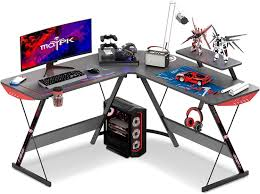
- Use the corner of the desk for your PC tower or additional equipment.
- Avoid blocking vents on PCs or consoles to prevent overheating.
Step 4: Optimizing Space for Comfort and Performance
- Leave enough room for your gaming chair and leg movement.
- Keep frequently used items within arm’s reach to minimize distractions.
- Use shelves or drawers for controllers, headsets, and other peripherals.
Step 5: Accessories to Enhance Your Desk Setup
- Monitor Stands: Elevate screens for better posture.
- Keyboard Trays & Mouse Pads: Reduce strain and improve accuracy.
- RGB Lighting & Headphone Hooks: Improve aesthetics and organization.
- Ergonomic Gaming Chair: Completes a comfortable and long-lasting setup.
Common Mistakes to Avoid When Buying an L-Shaped Gaming Desk
Even with so many options available, gamers often make mistakes that affect comfort, functionality, and long-term satisfaction. Here’s what to watch out for when choosing an L-shaped gaming desk:
1. Choosing the Wrong Size for Your Room
- Measure your space before purchasing.
- Avoid desks that are too large, which can crowd your room, or too small, which may not fit all your equipment.
- Consider leaving space for a gaming chair, walking area, and accessories.
2. Ignoring Ergonomics and Comfort
- Don’t sacrifice proper posture for aesthetics.
- Ensure monitor height, keyboard placement, and chair compatibility are comfortable for long gaming sessions.
- Look for desks with curved edges, adjustable height, or keyboard trays if needed.
3. Skipping Reviews and Reliability Checks
- Specs alone don’t tell the full story.
- Read user reviews and expert opinions for insights on durability, assembly, and stability.
- Poor-quality desks can wobble or wear out quickly, affecting your gaming experience.
4. Poor Cable Management Choices
- Avoid desks without cable channels or grommets if you have multiple devices.
- Messy cables can create clutter, safety hazards, and interfere with airflow for PCs or consoles.
5. Overlooking Features You Actually Need
- Don’t buy a desk with unnecessary features like built-in RGB if it’s not important to you.
- Focus on essentials such as stability, surface area, storage, and ergonomics.
L-Shaped Gaming Desk vs Other Desk Types
When choosing a gaming desk, it’s helpful to compare L-shaped desks with other common desk types to understand their advantages and disadvantages.
1. L-Shaped Desk vs Straight Desk
- L-Shaped Desk: Offers more surface area, corner placement for space optimization, and multiple zones for monitors, accessories, and consoles.
- Straight Desk: Simpler design, easier to move, and usually cheaper.
- Best For: L-shaped desks suit multi-monitor or large setups, while straight desks are ideal for smaller rooms or minimal setups.
2. L-Shaped Desk vs U-Shaped Desk
- U-Shaped Desk: Provides even more surface area, almost wrapping around the user, perfect for multi-tasking or large office/gaming spaces.
- L-Shaped Desk: More compact and fits in corners, using less room while still providing ample space.
- Best For: U-shaped desks are for large rooms or complex setups; L-shaped desks are more space-efficient.
3. L-Shaped Desk vs Compact Gaming Desk
- Compact Desk: Designed for small spaces, often with limited surface area and storage.
- L-Shaped Desk: Provides extra space, storage options, and better organization for accessories.
- Best For: Compact desks are for budget or small room setups; L-shaped desks are for gamers needing multi-device setups.
Maintenance Tips for Your L-Shaped Gaming Desk
A well-maintained L-shaped gaming desk lasts longer and keeps your gaming setup clean, organized, and efficient. Here are practical tips to maintain your desk:
1. Cleaning and Surface Care
- Wipe the surface regularly with a soft cloth and mild cleaner to remove dust and spills.
- Avoid abrasive cleaners that may scratch or damage the finish.
- Use coasters and mouse pads to prevent stains and scratches.
2. Tightening Screws and Frame Checks
- Periodically check and tighten screws, bolts, and joints to prevent wobbling.
- Inspect the frame for signs of wear, especially if the desk supports heavy monitors or equipment.
3. Protecting from Scratches and Spills
- Consider desk mats or protective pads for areas where keyboards, mice, or controllers are placed.
- Clean up liquid spills immediately to prevent warping or damage to wooden surfaces.
4. Organizing Cables and Accessories
- Keep cables neatly bundled and routed through cable management systems.
- Avoid overloading drawers or shelves to maintain stability.
- Periodically declutter and remove unused accessories to maintain a clean workspace.
Frequently Asked Questions (FAQs) About L-Shaped Gaming Desks
Here are some common questions gamers have when considering an L-shaped gaming desk, along with helpful answers:
1. Are L-shaped gaming desks worth it?
Yes. They provide extra surface area, better organization, and space optimization, making them ideal for multi-monitor setups, streaming, or corner rooms.
2. Can L-shaped desks fit in small rooms?
Absolutely. Many L-shaped desks are designed for corner placement, using space efficiently. Measure your room and choose a desk size that leaves room for a chair and movement.
3. Are they suitable for multi-monitor setups?
Yes. L-shaped desks offer ample surface area for dual or triple monitor setups, along with space for keyboards, mouse pads, and accessories.
4. How much should I spend on a quality L-shaped desk?
- Budget-friendly: $150–$250, suitable for casual gamers.
- Mid-range: $250–$400, with better materials, storage, and features.
- Premium: $400+, with adjustable height, RGB lighting, and professional-grade durability.
5. Do L-shaped desks come with cable management and storage options?
Many models do, including built-in trays, grommets, drawers, and shelves. Features vary, so check specifications before purchasing.
6. Can L-shaped desks be used for work and gaming simultaneously?
Yes. The separate zones in L-shaped desks allow one side for gaming and the other for work, making them versatile for home offices and gaming setups.
Next, we can move on to the Conclusion section to wrap up the article. Ready for me to continue?
You said:
final section
ChatGPT said:
Here’s the final section of your article:
Conclusion
An L-shaped gaming desk is more than just a piece of furniture—it’s an essential part of a functional, comfortable, and visually appealing gaming setup. Its corner-friendly design, spacious surface, and ergonomic features make it ideal for multi-monitor setups, streaming, and long gaming sessions.
When choosing the right desk, consider factors such as size, build quality, features, and budget. Pay attention to cable management, storage options, and ergonomics to create a setup that’s both organized and comfortable. Avoid common mistakes like buying a desk that’s too small, ignoring reviews, or neglecting ergonomics.
With proper setup and maintenance, an L-shaped gaming desk can provide years of reliable use while enhancing your gaming experience. Whether you’re a casual gamer, competitive player, or streamer, investing in a quality L-shaped desk ensures your gaming station is efficient, stylish, and ready for action.