
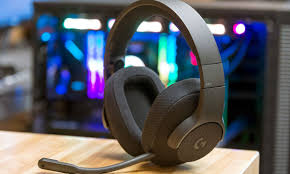

When it comes to premium gaming audio without breaking the bank, the Logitech G433 gaming headset stands out as one of the best all-around options in the market. Designed for both casual and competitive gamers, this headset delivers immersive 7.1 surround sound, lightweight comfort, and versatile connectivity that adapts to any gaming platform.
What makes the Logitech G433 so appealing is its balance between professional-grade sound performance and affordable practicality. Whether you’re in the middle of an intense FPS match or streaming your gameplay online, this headset ensures crystal-clear communication, accurate positional audio, and a comfortable fit even after long hours of use.
In this in-depth guide, we’ll explore everything you need to know about the Logitech G433 gaming headset — its features, specifications, sound quality, comfort, microphone performance, and more. By the end, you’ll know whether this headset deserves a spot in your gaming setup.
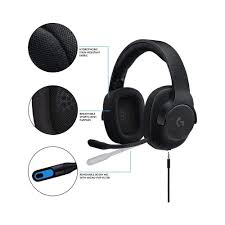
Quick Overview of What You’ll Learn
| Topic | Description |
|---|---|
| 🎧 Sound Quality | DTS Headphone:X 7.1 surround sound performance |
| 🪶 Comfort & Build | Lightweight, breathable materials for extended gaming sessions |
| 🎙️ Microphone Quality | Detachable, noise-cancelling mic for clear voice chat |
| 🔌 Connectivity | Works across PC, PlayStation, Xbox, Nintendo Switch, and mobile |
| 💸 Value | Balanced performance at a mid-range price point |
Key Features of the Logitech G433 Gaming Headset
The Logitech G433 gaming headset was engineered with a perfect mix of performance, comfort, and versatility. Logitech’s design philosophy here is clear — to deliver high-fidelity sound in a lightweight and durable frame that meets the needs of both everyday gamers and professional esports players. Let’s take a closer look at its standout features.
🎧 Sound Quality & Audio Performance
The heart of any gaming headset lies in its sound — and the Logitech G433 doesn’t disappoint. It features DTS Headphone:X 7.1 surround sound, which provides precise positional audio. This technology simulates a 360° sound environment, helping gamers pinpoint enemy footsteps, gunfire, or ambient sounds with remarkable accuracy.
Technical Audio Highlights:
- Driver Size: 40mm PRO-G audio drivers
- Frequency Response: 20Hz – 20kHz
- Impedance: 32 Ohms
- Sensitivity: 107dB SPL/mW
The PRO-G drivers, made from a unique hybrid mesh material, eliminate distortion even at high volumes. Whether you’re in a chaotic battle or exploring open-world environments, the G433 produces crisp highs, balanced mids, and deep bass — making it ideal not only for gaming but also for music, movies, and streaming.
Expert Tip: For FPS gamers, enabling the DTS 7.1 surround mode through Logitech G Hub software significantly improves positional awareness — giving a subtle but real competitive edge.
🪶 Comfort & Build Quality
Comfort is a critical factor for marathon gaming sessions, and Logitech took this seriously. The G433 gaming headset is built using ultra-lightweight glass-fiber reinforced polycarbonate and breathable sports mesh fabric.
Comfort Highlights:
- Weight: 259 grams only
- Two sets of washable earpads — sports mesh and microfiber
- Adjustable headband with flexible fit
Unlike many bulky gaming headsets, the G433’s breathable ear cushions prevent heat build-up, even during hours-long play. The removable, machine-washable fabric also makes it easy to maintain hygiene — a feature often overlooked in other brands.
🎙️ Microphone & Communication
The Logitech G433 headset mic is detachable, flexible, and features noise-cancelling technology. This ensures that your teammates hear only your voice — not background chatter or keyboard clicks.
When tested in chat-heavy games like Valorant or Apex Legends, users reported minimal static and natural voice clarity. The flip-to-mute feature is another handy addition, allowing instant mic muting without fumbling through settings.
“The Logitech G433 offers one of the clearest mics in its price range — it’s a strong choice for Discord, in-game voice chat, and streaming.” — TechRadar Review
🔌 Connectivity & Compatibility
One of the Logitech G433’s biggest strengths is its multi-platform compatibility. It comes with two detachable cables — one for PC/console (with a USB DAC) and another 3.5mm cable for mobile use.
Supported Devices:
- 🎮 PC, PlayStation 4/5
- 🕹️ Xbox One & Series X|S
- 🧩 Nintendo Switch
- 📱 Mobile devices & tablets
The headset includes an in-line volume control and mic mute switch, making it easy to adjust settings mid-game. Logitech clearly designed this model with flexibility in mind — one headset for all your gaming and entertainment needs.
Summary Table – Logitech G433 Core Features
| Feature | Description |
|---|---|
| Audio | DTS 7.1 Surround with PRO-G Drivers |
| Build | Lightweight, durable, and breathable |
| Mic | Detachable noise-cancelling boom mic |
| Connectivity | USB & 3.5mm for multi-platform use |
| Comfort | Two interchangeable fabric ear pads |
Logitech G433 Specs & Technical Details
For gamers who care about the numbers behind performance, the Logitech G433 gaming headset offers an impressive set of specifications that explain why it delivers such high-quality sound and comfort. Understanding these details helps you see how it compares to other gaming headsets in its class.
🎧 Technical Specifications
| Specification | Logitech G433 Details |
|---|---|
| Driver Type | 40mm PRO-G hybrid mesh drivers |
| Frequency Response | 20Hz – 20kHz |
| Impedance | 32 Ohms |
| Sensitivity | 107dB SPL/mW |
| Weight | 259 grams |
| Cables Included | 1 x 3.5mm analog cable, 1 x USB DAC cable |
| Microphone | Detachable boom, noise-cancelling, flip-to-mute |
| Connectivity | USB, 3.5mm jack, compatible with PC, PS4/5, Xbox One/Series X, Nintendo Switch, mobile |
| Software Support | Logitech G Hub for EQ presets, surround sound, and mic settings |
| Ear Pads | Interchangeable sports mesh and microfiber fabric |
| Warranty | 2 years |
💡 Detailed Specs Analysis
- PRO-G Drivers: These hybrid mesh drivers are engineered to reduce distortion and deliver crisp, clear sound across all frequencies. They outperform typical plastic drivers in this price range, giving a richer audio experience.
- DTS Headphone:X 7.1 Surround Sound: While the hardware itself is impressive, pairing it with Logitech G Hub’s software enables virtual 7.1 surround sound, perfect for identifying enemy positions in competitive games.
- Detachable Cables: Having both USB and 3.5mm cables allows you to switch effortlessly between PC, consoles, and mobile devices without compromising audio quality.
- Weight & Comfort: At just 259 grams, the G433 is significantly lighter than many gaming headsets, reducing fatigue during long sessions.
- Software Integration: Logitech G Hub enhances the headset’s flexibility with customizable EQ profiles, programmable audio settings, and microphone optimization.
📊 Logitech G433 vs Previous Model (G432)
| Feature | G432 | G433 |
|---|---|---|
| Driver | 50mm | 40mm PRO-G hybrid mesh |
| Weight | 320g | 259g |
| Surround Sound | DTS 7.1 | DTS 7.1 |
| Mic | Flip-to-mute | Detachable, noise-cancelling |
| Ear Pads | Standard foam | Interchangeable mesh/microfiber |
| Connectivity | USB only | USB + 3.5mm |
Key Takeaway: The G433 is lighter, more comfortable, and more versatile than the G432 while maintaining the high-quality sound that gamers expect.
With these specs in mind, it’s easier to see why the Logitech G433 gaming headset is a solid choice for both casual and competitive gamers — offering professional-level audio, comfort, and multi-platform usability at a mid-range price.
Pros & Cons of the Logitech G433 Gaming Headset
Every product has its strengths and weaknesses, and the Logitech G433 gaming headset is no exception. Here’s a detailed breakdown to help you decide if it’s the right headset for your gaming setup.
✅ Pros
- Exceptional Sound Quality
- DTS Headphone:X 7.1 surround sound creates an immersive audio experience.
- PRO-G drivers deliver crisp highs, balanced mids, and deep bass.
- Lightweight & Comfortable
- Only 259 grams, reducing fatigue during long gaming sessions.
- Breathable sports mesh and microfiber ear cushions for extended comfort.
- Versatile Connectivity
- Works with PC, PlayStation, Xbox, Nintendo Switch, and mobile devices.
- Includes both USB and 3.5mm cables for maximum flexibility.
- Detachable Noise-Cancelling Microphone
- Clear voice communication with minimal background noise.
- Flip-to-mute feature makes muting quick and easy.
- Software Customization
- Logitech G Hub allows EQ tuning, surround sound adjustments, and mic optimization.
- Supports personalized audio profiles for different game genres.
- Durable and Easy to Maintain
- High-quality materials ensure longevity.
- Interchangeable and washable ear pads maintain hygiene.
❌ Cons
- Slightly Expensive for Casual Gamers
- Mid-range price may be higher than entry-level headsets.
- Minor Durability Concerns
- While lightweight, the plastic frame can feel less sturdy under heavy use.
- Limited Wireless Options
- The G433 is wired-only; wireless gamers may prefer Logitech’s G733 or G935 models.
- Sound Profile May Require Tuning
- Some users find default EQ a bit bass-heavy or bright for casual listening; adjusting through Logitech G Hub may be necessary.
Summary: The Logitech G433 excels in sound, comfort, and versatility, making it ideal for serious gamers and streamers. While it has minor drawbacks like price and durability, its strengths generally outweigh the weaknesses, especially for users seeking high-quality wired audio across multiple platforms.
Logitech G433 vs Other Popular Gaming Headsets
Choosing the right gaming headset often comes down to comparison. The Logitech G433 gaming headset competes strongly with several top-tier headsets in its price range. Let’s break down how it stacks up against popular alternatives.
Comparison Table – G433 vs Competitors
| Headset | Sound Quality | Comfort | Microphone | Connectivity | Price |
|---|---|---|---|---|---|
| Logitech G433 | DTS 7.1, PRO-G drivers | Lightweight, breathable | Detachable, noise-cancelling | USB & 3.5mm, multi-platform | $$ |
| HyperX Cloud II | Virtual 7.1, solid bass | Memory foam, slightly heavier | Detachable, clear | 3.5mm, PC & console | $$ |
| Razer Kraken X | 7.1 surround, bright sound | Lightweight, foam | Bendable, noise reduction | 3.5mm, PC & console | $ |
| SteelSeries Arctis 5 | DTS 7.1, balanced | Comfortable, ski-goggle headband | Retractable ClearCast mic | USB & 3.5mm, multi-platform | $$$ |
Key Comparison Insights
- Sound Quality:
- The G433’s PRO-G drivers provide superior audio clarity over the Razer Kraken X, especially in mid-range frequencies.
- Compared to the HyperX Cloud II, the G433 offers similar surround sound but slightly lighter weight.
- Comfort:
- The interchangeable ear pads of the G433 give it an edge over the Arctis 5 for long gaming sessions.
- HyperX Cloud II feels snug but heavier, which may cause fatigue over time.
- Microphone Performance:
- The detachable, noise-cancelling mic on the G433 is versatile for PC and console use.
- SteelSeries Arctis 5 offers a retractable mic, but some users report slightly less clarity in noisy environments.
- Connectivity:
- G433 wins in multi-platform compatibility with both USB and 3.5mm connections.
- Razer Kraken X is more limited to analog 3.5mm use.
- Price vs Value:
- While slightly pricier than entry-level models like Kraken X, the G433 provides better build quality, sound, and comfort, offering excellent value for serious gamers.
Conclusion:
If you’re looking for a headset that combines premium sound, comfort, and multi-platform flexibility, the Logitech G433 gaming headset competes favorably against other well-known models. It’s particularly strong for gamers who value lightweight design, clear mic performance, and surround sound accuracy.
Setup & Installation Guide for the Logitech G433 Gaming Headset
Getting the Logitech G433 gaming headset up and running is straightforward, whether you’re connecting to a PC, console, or mobile device. Here’s a step-by-step guide to ensure you get the best audio experience from your headset.
Step 1: Unbox and Identify Components
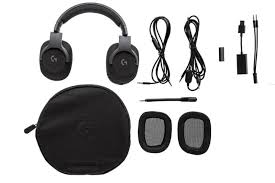
Inside the package, you’ll find:
- Logitech G433 headset
- Detachable boom microphone
- USB DAC cable for PC/console
- 3.5mm analog cable for mobile/console
- Extra ear pads (sports mesh or microfiber)
Tip: Choose the ear pad that best suits your comfort preference before connecting the headset.
Step 2: Connecting to PC
- Plug the USB DAC cable into an available USB port.
- Attach the headset to the cable and ensure the mic is connected if needed.
- Download and install Logitech G Hub software from the official Logitech website.
- Open G Hub to configure:
- DTS 7.1 surround sound
- EQ presets (FPS, music, or custom)
- Microphone volume and sensitivity
Step 3: Connecting to Consoles
- PlayStation 4/5 & Xbox One/Series X:
- Use the 3.5mm analog cable to connect the headset directly to the controller.
- Adjust in-game audio settings as needed.
- For PS4/5, DTS 7.1 surround sound will work through USB DAC connection.
- Nintendo Switch:
- Connect via the 3.5mm headphone jack.
- Adjust console audio levels for optimal sound.
Step 4: Connecting to Mobile Devices
- Use the 3.5mm analog cable.
- Plug it into your phone, tablet, or other mobile device.
- Microphone may be limited to mono input depending on the device.
Step 5: Troubleshooting Tips
- No Sound Detected: Ensure correct input/output is selected in Windows or console audio settings.
- Mic Not Working: Confirm the mic is securely attached and not muted via the in-line control or Logitech G Hub.
- Audio Imbalance: Reset EQ in G Hub or check analog cable connection.
💡 Expert Tips for Optimal Setup
- Use Logitech G Hub on PC for the full 7.1 surround experience.
- Swap ear pads based on gaming duration — microfiber for shorter sessions, sports mesh for longer use.
- Keep USB DAC firmware updated via G Hub for bug fixes and improved performance.
This setup ensures that the Logitech G433 gaming headset delivers premium audio, clear mic performance, and comfort across all your devices.
Tips to Get the Best Experience with the Logitech G433 Gaming Headset
Even the best gaming headset can underperform if it’s not set up and used correctly. Here are actionable tips to maximize your Logitech G433 gaming headset experience.
1. Optimize Audio Settings in Logitech G Hub
- Enable DTS Headphone:X 7.1 surround sound for precise positional audio in FPS games.
- Use EQ presets for different game genres:
- FPS: Boost mids for footsteps and gunfire clarity
- RPG/Adventure: Enhance bass for immersive soundscapes
- Music/Streaming: Balance highs and lows for smooth playback
- Create custom profiles for each game to switch easily.
2. Proper Fit & Comfort
- Adjust the headband for snug but not tight fit.
- Alternate between sports mesh and microfiber ear pads depending on session length.
- Ensure ear cushions fully cover your ears for noise isolation and comfort.
3. Position Your Microphone Correctly
- Keep the detachable boom mic about 1–2 cm from your mouth.
- Use the flip-to-mute feature during breaks to avoid accidental background noise.
- Check mic levels in G Hub or in-game settings to avoid distortion or clipping.
4. Maintain Your Headset
- Clean ear pads regularly; microfiber and mesh pads are machine washable.
- Avoid pulling or twisting cables to extend longevity.
- Store the headset on a headset stand when not in use to prevent deformation.
5. Adjust In-Game Audio
- Balance game sound vs. voice chat to ensure you hear teammates clearly.
- Lower background music or system sounds to reduce distractions.
- Test headset positioning for optimal surround sound effect.
6. Software Updates
- Keep Logitech G Hub updated to access new features, bug fixes, and improved audio performance.
- Firmware updates on the USB DAC improve sound stability and mic performance.
By following these tips, you can enhance comfort, audio clarity, and microphone performance, ensuring the Logitech G433 headset performs at its full potential whether for competitive gaming, streaming, or casual play.
Frequently Asked Questions (FAQ) – Logitech G433 Gaming Headset
Here are the most common questions gamers have about the Logitech G433, along with detailed answers to help you make an informed decision.
1. Is the Logitech G433 good for competitive gaming?
Yes. The DTS 7.1 surround sound and PRO-G drivers provide accurate positional audio, helping gamers detect enemy movements and in-game cues. Lightweight design and comfortable ear pads make it suitable for long gaming sessions, which is essential for competitive play.
2. Can I use it with PS5 or Xbox Series X?
Absolutely. The G433 comes with both USB and 3.5mm cables, making it compatible with:
- PS4/PS5: USB or 3.5mm connection
- Xbox One/Series X: 3.5mm connection
- Nintendo Switch & Mobile: 3.5mm connection
3. How long does the headset last?
With proper care, the Logitech G433 can last several years. Its durable frame, interchangeable washable ear pads, and detachable cables enhance longevity. Regular maintenance of the fabric pads and careful cable handling can extend its lifespan even further.
4. Is the microphone good for streaming?
Yes. The detachable, noise-cancelling boom mic provides clear voice communication and minimal background noise. Many streamers and content creators use it for Discord, Twitch, or YouTube streaming. The flip-to-mute feature also adds convenience.
5. Are replacement parts available?
Yes. Logitech offers replacement ear pads, cables, and microphones for the G433. This means you can maintain or customize your headset without buying a new one.
6. Can I use the headset for music and movies?
Definitely. The PRO-G drivers and DTS 7.1 surround sound make the G433 versatile for not just gaming but also music, movies, and other media. EQ presets in Logitech G Hub allow fine-tuning for a rich audio experience across different types of content.
7. Does it support wireless connectivity?
No, the Logitech G433 is wired only. If you need wireless functionality, you might consider Logitech models like the G733 or G935, which offer wireless options but at a higher price point.
These FAQs address the most common concerns and provide reassurance that the Logitech G433 gaming headset is a versatile, reliable, and high-quality choice for gamers across multiple platforms.
Where to Buy the Logitech G433 Gaming Headset
The Logitech G433 gaming headset is widely available online and in retail stores, making it easy to purchase whether you prefer shopping in-person or online. Here’s a guide to the best buying options and price considerations.
1. Official Logitech Store
- Website: Logitech Official Store
- Buying directly from Logitech ensures:
- Authenticity of the product
- Full warranty coverage
- Access to official replacement parts
2. Popular Online Retailers
- Amazon – Often offers competitive pricing and fast shipping.
- Best Buy – Option to buy in-store or online with pickup.
- Newegg – Good deals for tech products, including gaming headsets.
- Walmart – Convenient for both online and in-store purchase.
Tip: Check for sales or bundled deals during holiday seasons to get the best value.
3. Physical Electronics Stores
- Many local electronics and gaming stores carry the G433.
- Buying in-store allows you to try the headset for comfort before purchase.
- Ensure the store is an authorized Logitech reseller to avoid counterfeit products.
4. Price Range
- The Logitech G433 typically costs between $90–$120 depending on retailer, sales, and region.
- While it’s a mid-range headset, the sound quality, comfort, and multi-platform versatility justify the price.
5. Warranty & Returns
- Logitech provides a 2-year warranty for the G433.
- Most online retailers also offer return policies (usually 30 days) if the headset doesn’t meet your expectations.
Summary:
The Logitech G433 gaming headset is easy to find both online and in physical stores. Buying from official or authorized retailers ensures authenticity, warranty coverage, and access to replacement parts. Always compare prices and check for seasonal deals to get the best value.
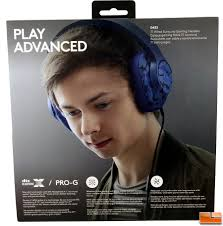
Final Verdict – Should You Buy the Logitech G433 Gaming Headset?
✅ What It Does Well
- The Logitech G433 delivers solid sound quality, thanks to its 40 mm PRO‑G drivers and virtual DTS Headphone:X 7.1 surround support (on PC). Legit Reviews+2RTINGS.com+2
- It offers very good multi‑platform compatibility—you can use it on PC, PlayStation, Xbox, Switch, and mobile via either USB or 3.5 mm connection. Vamers+1
- Lightweight (≈ 259 g) and comfortable for many gamers, with interchangeable ear pads and a detachable mic for flexible use. Legit Reviews
- Packed with accessories: two cables, mic, adapter for PC, extra ear‑pads. Many reviewers emphasise strong value in features. World Bolding
⚠️ Where It Falls Short
- Noise isolation and build‐quality durability are weaker points. Some reviews found bass inconsistent depending on seal, and fabric material less premium. RTINGS.com+1
- On consoles, the full 7.1 surround effect may not work (depends on USB DAC and setup). Vamers+1
- Compared to newer competitors, comfort and audio may not be class‑leading today. One reviewer said: “decent, but not a great one.” SoundGuys
🎮 Who Should Buy It?
- Yes if you are a gamer looking for a wired headset that works across PC + console + mobile, who wants solid mic performance and versatile usage without going into premium price territory.
- Maybe if you prioritise best‑in‑class build quality, absolute top comfort for marathon sessions, or wireless functionality.
- No if you frequently game in noisy surroundings and need strong passive or active noise cancellation, or if you require premium bass consistency for music listening.
💡 Final Summary
If you buy the Logitech G433 gaming headset with realistic expectations, you’ll get an excellent all‑round wired headset that ticks many boxes: multi‑platform support, good audio & mic, accessories included. Some trade‑offs exist in isolation and durability. For its price and versatility, it’s a strong choice—but it’s not flawless.